AI Coding Agents Should Be Programmable
“Simplicity is prerequisite for reliability.” - Edsger Dijkstra
There are dozens of different agentic coding assistants around right now, from Claude Code (Anthropic) and Codex (OpenAI) to Kiro (Amazon) and Goose (Block). Other open source coding agents include OpenCode, Aider, and Pi.
These human-in-the-loop coding agents are typically mutually exclusive with more autonomous programmatic agent frameworks (e.g., smolagents, PydanticAI, CrewAI).
As it turns out, having a programmatic API to a coding agent harness is incredibly useful.
The API Problem (and Recent Solutions)
Until recently, most coding agents lacked programmatic APIs. Proprietary ones locked you into their UIs. The open-source ones (OpenCode, Aider, Goose) are open and extensible, but they’re large, complex frameworks designed primarily for terminal interaction—not simple libraries you can import and compose.
Anthropic has since released the Claude Agent SDK (September 2025, formerly Claude Code SDK), bringing programmatic Python and TypeScript APIs to Claude-based agents. Codex now also has an SDK. Such programmatic APIs are a step forward in the ecosystem.
More recently, I started a hobby project called PatchPal, an open-source coding agent harness that implements both a terminal UI and a Python API. As I’ll illustrate below, when coding agents aren’t designed as composable libraries, entire categories of workflows become difficult or impossible.
The Ralph Wiggum technique—where an agent iterates autonomously until completion—demonstrates this perfectly. Geoffrey Huntley pioneered the approach in July 2025 with a 5-line bash script hack:
1
2
3
while :; do
  cat PROMPT.md | claude-code
done
That’s it. A bash loop that feeds the same prompt to Claude Code repeatedly. It worked surprisingly well—bash gave you just enough programmatic control to check tests after each iteration and continue until everything passed.
By December 2025, Anthropic had formalized it into an official plugin with “Stop Hooks” that intercept Claude’s exit internally. Cleaner UX, but the loop is still opaque—hidden in a markdown state file, sensitive to permissions, easy to break. As Dexter Horthy discovered, it “dies in cryptic ways unless you use --dangerously-skip-permissions.”
Both approaches work for the basic loop. But both are fundamentally limited:
Bash scripts give you control but no state. You can’t inspect the agent’s message history, track token usage, or access cost data. You pipe text in, get text out, and that’s it. Want to switch models mid-session? Switch to a cheaper model after the first attempt? Implement a budget limit? You’re writing brittle shell parsing code or just can’t do it.
Plugins give you integration but no composability. The loop runs inside Claude Code’s process, so you can’t import it into a Python script, call it from a Jupyter notebook, or integrate it into CI/CD. The abstraction is opaque—when something breaks, you’re debugging markdown state files and permission flags, not looking at clear code.
This is the API problem. How can we programmatically compose agents into real workflows?
What Is Ralph?
Before I explain why a programmatic API matters, it’s worth understanding the technique a little more.
The Ralph Wiggum technique is deceptively simple:
1
2
3
4
5
6
7
1. Agent works on task
2. Agent tries to exit
3. Stop hook intercepts ← The key!
4. Same prompt fed back
5. Agent sees previous work in conversation history
6. Agent adjusts approach
7. Repeat until completion promise found
The agent never actually “completes”—every time it tries to return, you check for a completion promise (a specific string like <promise>COMPLETE</promise>). If not found, you feed the same prompt back. The agent sees its previous work, notices failing tests, spots bugs, and refines iteratively.
It’s surprisingly effective. Tasks that fail on first attempt often succeed after 5-10 iterations as the agent debugs its own output.
Claude Code implements this internally. Great—if you use Anthropic’s models exclusively and don’t need to modify the behavior. What if you want to:
- Use a cheaper model or a local model to reduce API costs?
- Run multiple sequential phases with different completion criteria?
- Add custom logic between iterations?
- Track costs and context usage programmatically?
You’re out of luck. No API means no customization.
ralph.py: A Model-Agnostic Implementation
What if the entire Ralph technique was just a Python function you could import and use with any model?
The loop below leverages the Python API in PatchPal to implement a basic ralph loop.
1
2
3
4
5
6
7
8
9
10
11
12
13
14
15
16
17
18
19
20
21
22
23
24
25
26
27
28
29
30
31
32
33
#!/usr/bin/env python3
"""ralph.py - Autonomous coding via iterative refinement"""

# Disable permissions for completely autonomous operation
import os
os.environ["PATCHPAL_REQUIRE_PERMISSION"] = "false"

from patchpal.agent import create_agent

def ralph_loop(prompt: str, completion_promise: str, max_iterations: int = 50):
    """
    The stop hook pattern: agent never actually completes until it outputs
    the completion promise. Each iteration, agent sees previous work in history.
    """
    agent = create_agent()

    for iteration in range(max_iterations):
        print(f"🔄 Ralph Iteration {iteration + 1}/{max_iterations}")

        # Same prompt every time - agent's message history accumulates
        response = agent.run(prompt)

        # Check for completion promise
        if completion_promise in response:
            print(f"✅ COMPLETION after {iteration + 1} iterations!")
            print(f"Total cost: ${agent.cumulative_cost:.4f}")
            return response

        # Stop hook: no completion found, continue
        print("⚠️ No completion promise. Continuing...")

    print(f"⚠️ Max iterations reached")
    return None
As you can see, the core loop is is only a few lines of code. Run it from the command line:
1
python ralph.py --prompt "Build a REST API with tests for a TODO app. Run pytest. Fix failures. Output: <promise>COMPLETE</promise> when finished" --completion-promise "COMPLETE" --max-iterations 30
Or import it into your own code:
1
2
3
4
5
6
7
8
9
10
11
12
13
from ralph import ralph_loop

# In a CI pipeline
ralph_loop(prompt=f"Fix failing tests: {test_output}", completion_promise="FIXED")

# In a Jupyter notebook
ralph_loop(prompt="Analyze data.csv and create plots and output <promise>DONE</promise> when done.", completion_promise="DONE")

# With custom logic
agent = create_agent()
response = ralph_loop(prompt, completion_promise)
if agent.cumulative_cost > 10.0:
    alert_team("Ralph exceeded budget")
This is what a programmatic API enables. Not “can you make it loop”—bash does that. Not “can you integrate with one tool”—plugins do that. But “can you compose the agent into arbitrary workflows using actual code?”
The Difference
Let’s compare the three approaches:
| Capability | Bash Script | Claude Plugin | Python API |
|---|---|---|---|
| Basic loop | ✅ Yes | ✅ Yes | ✅ Yes |
| Inspect agent state | ❌ No | ❌ Opaque | ✅ agent.messages |
| Track costs | ❌ Parse logs | ❌ External | ✅ agent.cumulative_cost |
| Switch models mid-session | ❌ Restart process | ❌ Not supported | ✅ create_agent(model=...) |
| Budget limits | ❌ Shell math | ❌ Not supported | ✅ if cost > limit: stop |
| Multi-phase workflows | ⚠️ Multiple scripts | ❌ Manual | ✅ Sequential function calls |
| Import into Python | ❌ Subprocess | ❌ No | ✅ from ralph import ralph_loop |
| Jupyter notebooks | ❌ No | ❌ No | ✅ Import and run |
| Error handling | ⚠️ Exit codes | ❌ Opaque | ✅ Try/catch, inspect state |
| Debugging | ⚠️ Parse stdout | ❌ Markdown files | ✅ Python debugger |
| Model agnostic | ⚠️ One CLI tool | ❌ Claude only | ✅ Any LiteLLM model |
The bash script works for the basic case. The plugin is cleaner if you only use Claude Code interactively. But neither gives you composability—the ability to treat the agent as a library you can build on top of.
A Python API (or any proper programmatic API) makes the agent a primitive. You can inspect its state, control its execution, compose multiple agents, integrate into existing tools, and add arbitrary logic. You’re not fighting with shell parsing or reverse-engineering markdown files—you’re writing normal code.
Why This Matters
Having a Python API means the agent becomes a composable primitive instead of a monolithic application.
Things that might have been more challenging become much easier with a ralph.py:
Example 1: Automated Code Review Fixes
1
2
3
4
5
6
7
8
9
# post-review.py - run after code review
review_comments = load_review_comments()

for comment in review_comments:
    ralph_loop(
        prompt=f"Address review comment: {comment.text} in {comment.file}:{comment.line}. Output: FIXED",
        completion_promise="FIXED",
        max_iterations=5
    )
Example 2: Cost-Optimized Development
1
2
3
4
5
6
7
8
# Use expensive model for first attempt, cheap model for iterations
agent = create_agent(model="anthropic/claude-opus-4-5")
response = agent.run(prompt)

if some_condition_is_met: # e.g., cost threshold
    # Switch to cheaper model for refinement iterations
    agent = create_agent(model="anthropic/claude-haiku-4-5")
    ralph_loop(prompt, completion_promise, max_iterations=20)
Example 3: Jupyter Notebook Development
1
2
3
4
5
6
7
8
9
10
# In a Jupyter cell
from ralph import ralph_loop

# Analyze dataset
ralph_loop(
    prompt="Load data.csv, generate summary statistics, create visualizations. Output: ANALYSIS_COMPLETE",
    completion_promise="ANALYSIS_COMPLETE",
    max_iterations=10
)
# view results in the notebook
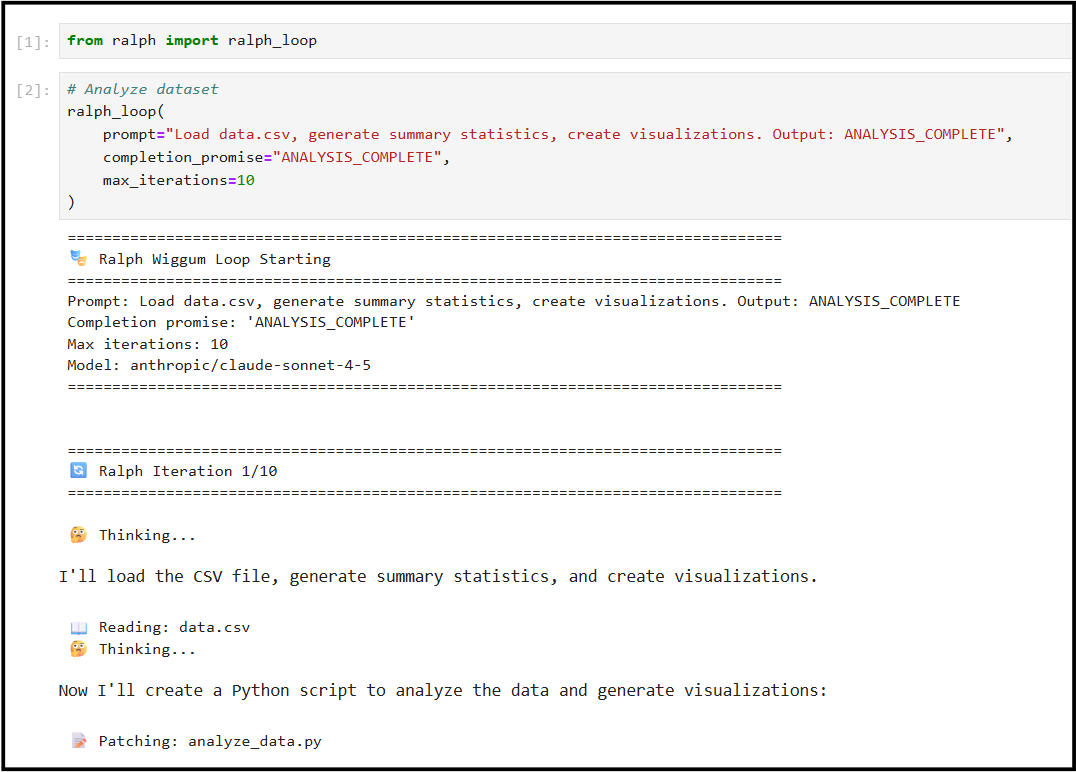
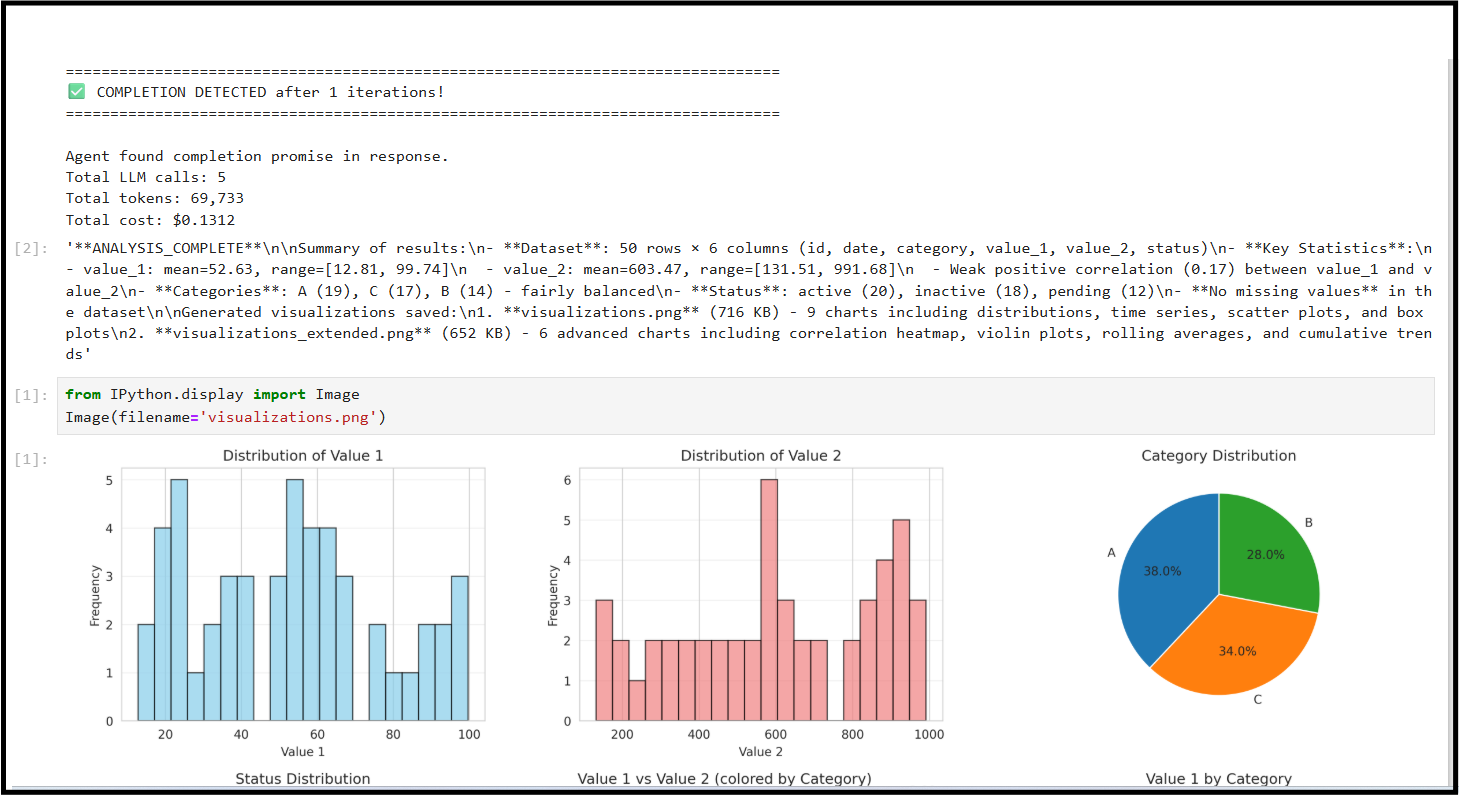
The common thread in these examples is that they work because the agent is also a Python library you can import and compose:
- Cost tracking -
agent.cumulative_costtracks spending in real-time - Model switching - Can swap models mid-session
- State inspection - Access tokens, message history, message count, tool calls at any point
- Context management -
agent.context_managerhandles gives you more control over compaction and pruning for cost optimization
Any of the above can be challenging when limited to an interacive terminal or desktop UI.
Beyond Ralph Loops
The examples above were simply invoking ralph_loop and doing things before and after. Armed with a Python API, you can, of course, also modify ralph_loop itself for fine-grained customization or perhaps not use a loop at all.
The Python API supports a full spectrum of autonomy levels:
- Autonomous loops (Ralph): Agent iterates until completion
- Controlled agent execution: Non-looping
agent.run()calls for less autonomous, more predictable, step-by-step workflows - Direct tool invocation: Call tools as regular Python functions with no agent/LLM involved
Controlled Agent Execution and Direct Tool Invocation
For less autonomous workflows, you can orchestrate the agent with sequential agent.run() calls instead of letting it loop:
1
2
3
4
5
6
7
8
9
10
11
12
13
14
15
from patchpal.agent import create_agent

agent = create_agent()

# Step 1: Analyze codebase
agent.run("Use get_repo_map to analyze the project structure")

# Step 2: Read specific file based on previous analysis
agent.run("Read the authentication module at src/auth.py")

# Step 3: Make targeted changes
agent.run("Add rate limiting to the login endpoint")

# Step 4: Run tests
agent.run("Execute pytest and show results")
You can also bypass the agent entirely and call tools directly as regular Python functions—no LLM involved, no agent overhead. For example, building a CI pipeline that uses the agent for complex analysis but handles simple operations directly using the agent harness:
1
2
3
4
5
6
7
8
9
10
11
12
13
from patchpal.agent import create_agent
from patchpal.tools import grep, read_file, git_diff

# Direct tool calls for deterministic operations
changed_files = git_diff(staged=True)
todos = grep(pattern="TODO:", file_glob="*.py")

if todos:
    # Use agent when reasoning is needed
    agent = create_agent()
    agent.run(f"Review these TODOs and determine which are blockers: {todos}")
else:
    print("✅ No TODOs found")
All file operations, git tools, code analysis, and other built-in tools are available as importable functions. See the Built-In Tools documentation for the complete list.
Cost Optimization
Running 30+ iterations with Claude Opus 4.5 or Claude Sonnet 4.5 can get expensive. Let’s look at cost optimization a little further.
With a Python API, you have options:
Option 1: Budget Limits
1
2
3
4
5
6
7
8
9
10
11
def ralph_loop_with_budget(prompt, completion_promise, max_cost=5.0):
    agent = create_agent()

    for iteration in range(100):
        if agent.cumulative_cost > max_cost:
            print(f"⚠️ Budget limit reached: ${agent.cumulative_cost:.2f}")
            return None

        response = agent.run(prompt)
        if completion_promise in response:
            return response
Option 2: Switch to cheaper model whenever you want
1
2
3
4
5
6
7
8
# Use more expensive Claude Opus 4.5 at first
agent = create_agent(model="anthropic/claude-opus-4-5")
initial_response = agent.run(prompt)

if some_condition_is_met(initial_response, agent.cumulative_cost):
    # Switch to cheaper model
    agent = create_agent(model="anthropic/claude-haiku-4-5")
    ralph_loop(agent, prompt, completion_promise)
These optimizations require programmatic access to cost tracking and model configuration. Usually impossible through a UI.
Trying ralph.py Yourself
1
2
3
4
5
6
7
8
9
10
11
12
13
pip install patchpal

# Download ralph.py example
curl -O https://raw.githubusercontent.com/amaiya/patchpal/main/examples/ralph/ralph.py

# Try it
python ralph.py --prompt "Build a simple Flask hello world app with a test. Output <promise>COMPLETE</promise> when finished" --completion-promise "COMPLETE" --max-iterations 10

# Or use the integrated autopilot command
patchpal-autopilot --prompt "Build a simple Flask hello world app with a test. Output <promise>COMPLETE</promise> when finished" --completion-promise "COMPLETE" --max-iterations 10

# Or use as a library - ralph has been integrated into PatchPal's autopilot module
python -c "from patchpal.autopilot import autopilot_loop; autopilot_loop(prompt='...', completion_promise='COMPLETE')"
Security Note: ralph.py disables permission checks for fully autonomous operation. Running in containers or sandboxed environments is strongly recommended—never on production systems or with access to sensitive data. To run with permission checks, you can remove os.environ["PATCHPAL_REQUIRE_PERMISSION"] = "false" from ralph.py.
More Information: Code, docs, and examples are available at: github.com/amaiya/patchpal